iDempiere Mobile is a Flutter app for Android and iOS that talks to your iDempiere instance over its REST API. It is built for the warehouse aisle, the customer car park and the approver between meetings — not for someone sitting in front of the full web client.
The classic failure of a desktop-only ERP is not the software — it is the gap between where a transaction happens and where it gets keyed in. A stock move happens in an aisle, a delivery is signed for on a loading dock, an order is agreed across a counter. If the only way into iDempiere is a browser on a workstation, all of that is written on paper first and typed in hours later.
That lag is where errors, disputes and stale stock figures come from. iDempiere Mobile closes it by putting the specific tasks each person needs directly on the device already in their pocket.
Storage On Hand instead of a printout from this morning.C_Order with the correct Price List Version and an instant credit check, standing in front of the customer.Each screen maps to a real iDempiere document or process. Nothing here is a novelty — it is the handful of jobs that genuinely belong on a phone or a rugged handheld.
Raise an order against the right Business Partner and Price List Version, with live pricing, tax and a real-time credit-limit check before it is submitted. The order posts into iDempiere as a normal C_Order for the back office to confirm and invoice.
Scan or search a product and see on-hand, reserved and available quantities across every warehouse and locator — with lot, serial and Product Attribute Set detail where you use them.
The camera or an attached scanner drives pick, pack and ship. Scanning validates the right product, lot and quantity against the shipment line, so the wrong case never leaves the building.
Receive against a purchase order at the dock. Confirm quantities, capture lot and expiry, flag short or damaged lines, and create the M_InOut receipt without walking back to a terminal.
Confirm the shipment, capture the recipient's name and an on-screen signature, add a photo of the delivered pallet, and complete the M_InOut — proof of delivery attached to the document itself.
Run cycle counts and full stocktakes by locator. Enter counted quantities, see the variance against the system figure, and post a Physical Inventory document for review — no double-keying from tally sheets.
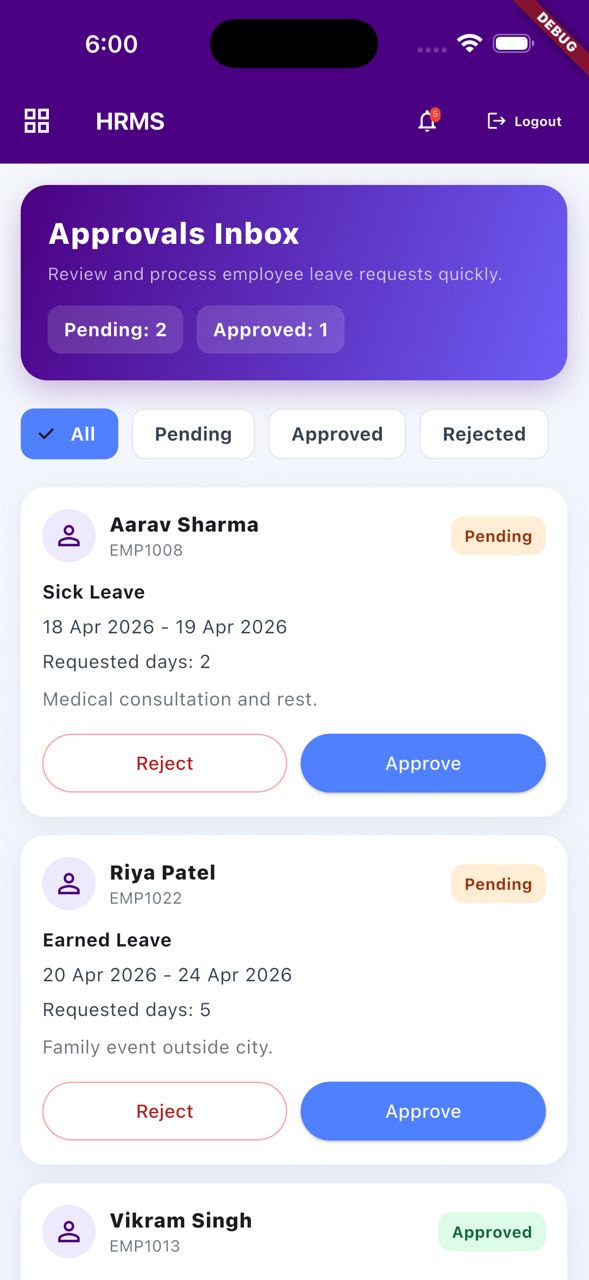
Approve or reject documents routed to you through iDempiere's document workflow — orders, requisitions, invoices, expenses. A push notification arrives the moment something needs you, with the full context to decide.
Log an expense with a photo of the receipt attached, coded to the right account and project, and send it into the same approval flow — instead of a shoebox reconciled at month-end.
Record a visit against the Business Partner — notes, next action, and geolocation — so the CRM history reflects what actually happened in the field, not what someone remembers to type on Friday.
Cold stores and steel-clad warehouses lose signal. The app keeps working offline, queues what you do, and syncs when the connection returns — with conflict-safe rules so two people never silently overwrite each other.
Two people, two very different jobs, one ERP behind both.
Priya starts her shift and logs in with her iDempiere user; the app opens straight to her pick queue because that is all her role is allowed to touch. She scans a shipment barcode and the app shows her the pick list for order lines, sorted by locator so she walks the aisles once, not five times.
At each bin she scans the product. If she reaches for the wrong lot the app stops her before the case is on the trolley. When a location is short she flags it, and a replenishment request is raised without her leaving the aisle. She confirms the pick, moves to pack, scans the carton, and the M_InOut shipment is confirmed. Two of the aisles are in a chilled room with no signal; the app simply queues her scans and syncs them the moment she is back in range. Her despatch paperwork is a memory.
Karan is parked outside a distributor. He opens the customer, sees their current balance, credit limit and the three invoices going overdue this week — so he raises those before he talks new business. He starts an order, and every line prices itself from the customer's Price List Version with the correct tax; the running total and the remaining credit update as he adds items.
One line would push the customer over their limit, so the app warns him and the order is held for approval rather than blocked outright. He submits it, logs the visit with a note and the next action, and photographs a competitor's shelf display against the account. By the time he is back in the car the order is a live C_Order in iDempiere and his sales manager has already seen the visit. Nothing waits for an evening of data entry.
The app respects the same role, organisation and window access you configured in iDempiere. A picker never sees pricing; a rep never sees the count sheet.
| Role | Primary screens | iDempiere documents behind them |
|---|---|---|
| Warehouse picker | Pick queue, barcode scan, pack & ship confirm | M_InOut (customer shipment), Storage On Hand |
| Goods-in operator | Receive against PO, lot/expiry capture, short/damage flag | M_InOut (vendor receipt), C_Order (purchase) |
| Stock controller | Stock enquiry, cycle count, physical inventory | Physical Inventory, Storage On Hand, Attribute Sets |
| Field sales rep | Order capture, price & credit check, visit log | C_Order (sales), Business Partner, Price List Version |
| Delivery driver | Delivery list, signature, photo POD | M_InOut, document attachments |
| Approver / manager | Approval inbox, push alerts, expense review | Document workflow, Expense Report |
| Any employee | Expense capture with receipt photo | Expense Report, GL account & project coding |
Nothing new to administer. Because access is driven by the roles, organisations and window permissions already in iDempiere, adding a user to the app is the same task as adding them to the ERP. There is no second security model to keep in step.
A phone is easier to lose than a workstation. The app is built on that assumption.
No middle-tier of its own to maintain, no shadow database, no second copy of your business rules.
The app is a single Flutter codebase compiled to native Android and iOS. It talks to iDempiere's REST API — the same interface used for integrations — so every read and write goes through the ERP's own model layer. That matters: callouts, model validators, tax engine, pricing and the document workflow all fire exactly as they would in the ZK web client. The app does not re-implement any business logic, which is what keeps it honest as your configuration evolves.
Reference data such as products, price lists and business partners is cached on the device so the app is fast and usable without a live connection. Transactions you create offline are held in a local queue with their own state. When connectivity returns, the queue drains to the server in order.
What happens on a sync conflict. Each queued action carries the version of the record it was based on. On sync, the server checks whether that record changed underneath it. If the picked line is still valid, it posts. If another user already shipped or amended it, the app does not silently overwrite — it surfaces the conflict to the user with both versions and lets them re-confirm, retry or discard. Stock movements are validated against current Storage On Hand at post time, so the app can never drive on-hand below reality just because it was working from a stale cache.
Practically, the queue means a picker in a dead zone keeps working and a rep on a train keeps selling. The conflict rules mean that convenience never costs you data integrity.
Because the app rides on your existing iDempiere configuration, standing it up is a short exercise: expose the REST API, enrol a pilot set of devices, and pick one process to prove.
We start with a single flow — usually warehouse picking or field order capture — with a handful of users. The screens are deliberately simple, so training a picker takes minutes rather than a day. Once the pilot is confirming shipments cleanly, we widen to the rest of the team and add the next process. Rugged handhelds and standard phones are both supported; you choose the hardware.
Expose and secure iDempiere's REST API on your instance, behind TLS.
Register the pilot handsets and set token and wipe policy.
Run picking or order capture with a few users on real data.
Add users and processes once the first flow is solid.
It is a task app, not a replacement for the full ZK web client. You will not run month-end, design a report, edit the Application Dictionary or configure an Accounting Schema from a phone — nor should you want to. Those are seated, considered jobs that belong on the desktop.
What the app does is take the ten or so tasks that happen away from a desk and make them fast, accurate and immediate. It deliberately shows each user a narrow set of screens. If a process isn't on a phone, that is usually a decision, not a gap — we would rather add a genuinely field-shaped flow than cram the whole ERP onto a small screen and call it mobile. When you need the depth of the full client, it is still there in the browser, unchanged.
We will connect the app to a copy of your iDempiere instance and walk a real picking or field-sales flow with you — no licence to buy, no obligation.